You ordered something important online. The seller said it shipped. Days pass, and you realize you never received a tracking number. Now you are stuck wondering where your package is and whether it will ever arrive.
This situation happens more often than you might think. According to information, millions of USPS customers face similar challenges when tracking information gets lost, misplaced, or simply never provided. The good news is that you have several legitimate options to locate your package even without that elusive tracking number.
The United States Postal Service has developed tools specifically designed to help customers monitor their incoming mail and packages. From the free Informed Delivery service to helpful strategies for working with senders, there are practical solutions available.
This comprehensive guide walks you through every verified method to track your USPS package without a traditional tracking number. You will learn about Informed Delivery, how to work with senders, what to do when packages go missing, and how to protect yourself from common scams that target people searching for their deliveries.
Whether you are a recipient waiting for a package or a sender who lost the tracking information, this article provides clear, actionable steps to help you find your mail.
Why You Might Not Have a USPS Tracking Number
Understanding why you do not have a tracking number helps you figure out the best solution for your specific situation.
USPS does not automatically provide tracking for every piece of mail. According to USPS official information, certain items simply do not come with tracking numbers. These include postcards, First-Class Mail letters and flats, periodicals, and some USPS Marketing Mail parcels. If someone sent you a regular letter or a standard envelope, there is no tracking number to find because one was never created.
For packages that do qualify for tracking, the tracking number is generated and provided to the sender at the time of mailing. This is an important detail. According to USPS guidelines, the tracking number belongs to the person who created the shipping label. If you are the recipient, the sender is the one who has this information.
Tracking numbers can get lost in several ways. The sender might have forgotten to share it with you. It could be buried in an email confirmation you overlooked. Perhaps the seller provided it on a receipt that got discarded. Sometimes, when ordering from third-party marketplaces, the tracking information appears in your account dashboard rather than in a separate email.
There is also the possibility that your package was shipped using a service that does not include tracking. First-Class Mail packages sometimes fall into this category unless the sender added an extra service. Priority Mail and Priority Mail Express always include tracking, but economy shipping options might not.
If you are a sender who lost the tracking number, USPS Care Center agents and local Post Offices cannot help you recover it. According to USPS, these representatives do not have a way to retrieve lost tracking numbers. This makes it essential to keep records of your shipping receipts and online label records.
Use USPS Informed Delivery to See Incoming Packages
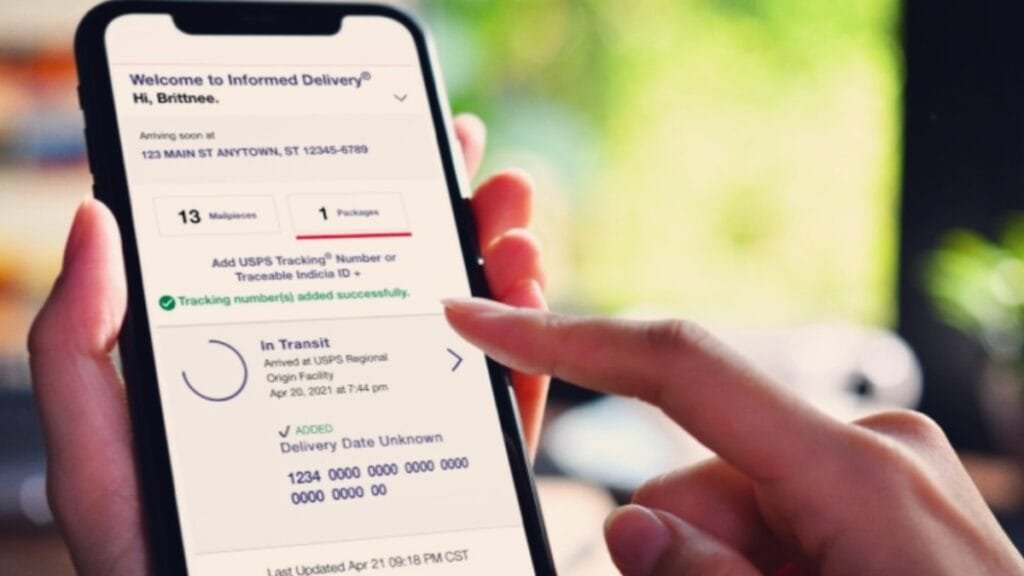
Informed Delivery is your best friend when you need to track a USPS package without a tracking number. This free service from the United States Postal Service gives you a digital preview of your incoming mail and provides package tracking capabilities that work even when you do not have the tracking number in hand.
What Is Informed Delivery?
Informed Delivery is a free feature that allows customers to digitally preview their incoming letter-size mail and manage package deliveries. According to USPS, more than 67 million customers have enrolled since the service launched in 2017.
The service works by capturing images of your mail as it processes through USPS sorting facilities. You then receive these images through daily email digests or by checking your online dashboard. For packages, the system automatically shows tracking information for most USPS domestic packages tied to your address.
How Informed Delivery Helps Without a Tracking Number
Here is where Informed Delivery becomes incredibly valuable. According to USPS, most domestic packages associated with the address on your USPS.com account will automatically appear in your Informed Delivery emails and dashboard. You do not need to enter a tracking number to see them.
This means if someone sends you a package, and you are an Informed Delivery subscriber, the tracking number will appear in your dashboard automatically. You can then use that information to monitor your package’s journey to your doorstep.
Setting Up Informed Delivery
Signing up for Informed Delivery takes just a few minutes. Visit the USPS website and navigate to the Informed Delivery section. You will need to create a USPS.com account if you do not already have one.
The verification process confirms your identity and address. This security measure prevents others from signing up to see your mail. According to USPS, you can enable two-factor authentication for additional security.
Once enrolled, you will start receiving daily email notifications showing what mail and packages are scheduled to arrive at your address. You can also access your dashboard anytime to check for incoming items.
The New Informed Delivery Mobile App
In October 2025, USPS launched a standalone Informed Delivery Mobile app, making it even easier to manage your mail and packages. The app is available for download on both Apple and Android devices.
According to USPS, the app includes push notifications for updates about incoming mail and packages, biometric login options for enhanced security, and improved package tracking capabilities. You can scan tracking numbers or barcodes and share package status with others.
A more recent update in 2026 added even more features, including package management options that let you see USPS Smart Locker packages, edit delivery instructions, and schedule redelivery. The app also now offers a dark viewing mode and the ability to switch between multiple addresses and accounts.

Ask the Sender for Your Tracking Information
Sometimes the simplest solution is the most effective. If you are expecting a package and need the tracking number, the sender is your best resource.
Why the Sender Has Your Tracking Number
When someone ships a package through USPS, the tracking number is generated at the point of sale and provided to the sender. According to USPS, the tracking number appears on the sales or mailing receipt, the online label record if postage was purchased online, or below the barcode placed on the mailed item.
If you ordered from an online retailer, the tracking number typically appears in your order confirmation email or in your account on the retailer’s website. Many e-commerce platforms automatically generate this information and make it accessible through your order history.
How to Request Tracking Information
• Reaching out to the sender is straightforward. If you ordered from an online store, check your account dashboard first. Many retailers display tracking information prominently on the order details page.
• If you cannot find it there, contact customer service. Provide your order number and ask them to share the tracking information. Most legitimate businesses will respond quickly with this information.
• For packages from friends or family, simply ask them for the tracking number. They should have received a receipt when they mailed the package. If they used Click-N-Ship or another online postage service, the tracking number would be in their email confirmation or online account.
What If the Sender Cannot Find It?
According to USPS, local Post Offices and Care Center agents cannot recover lost tracking numbers. If the sender genuinely lost the tracking information, your options become more limited.
However, if you are an Informed Delivery subscriber, you may still be able to see the package in your dashboard. The system automatically links packages to your address, so the tracking information might appear there even if the sender cannot provide it.
Find Tracking Numbers on Receipts and Records
If you are the sender and lost your tracking number, several places might still have the information you need.
Check Your Mailing Receipt
When you mail a package at a USPS location, you receive a receipt. According to USPS, this receipt contains your tracking number. Check your wallet, your car, or anywhere you might have stored this receipt after your post office visit.
Review Your Online Label Records
If you purchased postage online through Click-N-Ship, eBay, or another service, your tracking number is stored in your account. Log into the platform you used and look for your shipping history or label records.
According to USPS, your online label record will contain the tracking number associated with each shipment. This is often the easiest way to recover a lost tracking number if you shipped the package yourself.
Look at the Label Itself
If you still have a copy of the shipping label, the tracking number appears below the barcode. This is true whether you printed the label at home or received it at the post office
Check Your Email
When you purchase postage online, confirmation emails typically include the tracking number. Search your email inbox for messages from USPS, Click-N-Ship, or the platform you used to create the label. Using search terms like “USPS tracking” or your recipient’s name can help narrow down the results.
Redelivery Notices
If you received a PS Form 3849, also known as a “We ReDeliver for You!” notice, you can use the barcode number on that notice to search on USPS.com. According to USPS, entering the redelivery barcode number will return all tracking numbers associated with that delivery attempt.
Track Packages Through Your Address and Mail History
Even without a tracking number, your address and mail history can help you locate information about incoming packages.
The Role of Your USPS.com Account
Creating a USPS.com account and verifying your address unlocks several tracking capabilities. When your address is verified, USPS can automatically associate packages with your account. This means you can see incoming packages even without manually entering tracking numbers.
Your account dashboard shows your package history, including items that have been delivered and those currently in transit. This is particularly helpful if you have lost track of a specific shipment.
Informed Delivery Dashboard Features
The Informed Delivery dashboard provides a comprehensive view of your incoming mail and packages. According to USPS, you can view grayscale images of the exterior, address side of incoming letter-sized mail pieces.
For packages, the dashboard shows tracking information and delivery status. If you have multiple packages coming, they will all appear here as long as they are associated with your verified address.
Checking Your Delivery History
If you are trying to locate a package that may have already been delivered, your Informed Delivery dashboard maintains a history. You can scroll back to see previous deliveries and verify whether a package arrived on a specific date. This is useful when you are unsure whether a package was delivered or is still in transit. The dashboard provides clarity that might otherwise require a tracking number.
What to Do When a USPS Package Is Missing
Sometimes packages genuinely go missing. Whether you have a tracking number or not, USPS has procedures to help locate lost mail.
Submit a Missing Mail Search Request
According to USPS, you can submit a Missing Mail search request starting seven days from the mailing date. This request initiates an investigation into your package’s whereabouts.
To submit a search request, you will need to provide several details. These include the sender’s mailing address, the recipient’s mailing address, the size and type of container or envelope used, and identifying information such as any tracking numbers, the mailing date from your receipt, or Click-N-Ship label receipt.
You should also provide a description of the contents, including what the item is and details like brand, model, color, or size if applicable. Pictures that could help USPS recognize your item are also valuable.
What Happens After You Submit a Request
When USPS receives your Missing Mail search request, they send a confirmation email. They also provide periodic updates about the search progress. If the package is found, USPS will send it to the address you provided. However, USPS notes that sometimes missing mail items cannot be found, and it is possible that a package will not be recovered if it was not safe to forward.
Filing a Claim
If your package included insurance, you may be able to file an insurance claim. According to USPS, claims for damaged or missing contents should be filed immediately but no later than 60 days from the date of mailing. For packages with a money-back guarantee, such as Priority Mail Express, you may be eligible for a refund if the package was not delivered on time.
Contacting Your Local Post Office
Your local Post Office can sometimes provide information about packages destined for your address. While they cannot recover lost tracking numbers, they may have records of delivery attempts or packages being held for pickup. If you received a delivery notice, bring it with you when visiting the Post Office. The staff can use the information on the notice to locate your package.
USPS Text Tracking and Mobile Options
USPS offers several ways to track packages, and some of these options can help even when you are working with limited information.
USPS Text Tracking
According to USPS, you can send a text to 28777 with your tracking number to receive tracking updates. Standard message and data rates may apply. While this service requires a tracking number, it is worth noting for future shipments. Once you receive a tracking number from a sender, you can use text tracking to get updates directly on your phone.
USPS Mobile App
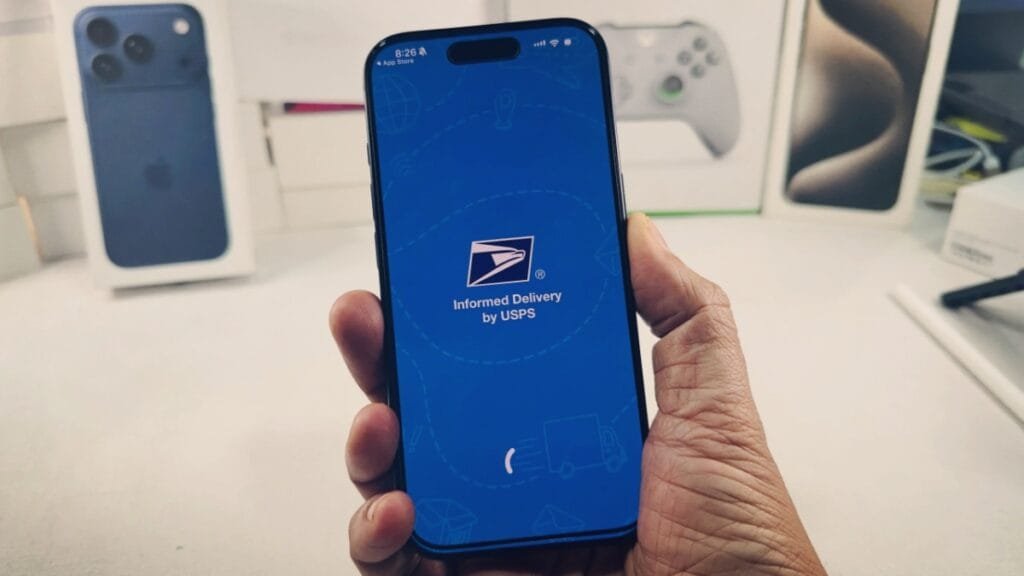
The USPS Mobile app for iPhone and Android provides tracking capabilities on your smartphone. The app allows you to track packages, schedule redelivery, and access other USPS services. The Informed Delivery Mobile app, launched in 2025, takes this further by automatically showing packages associated with your address. Even without a tracking number, you can see incoming packages if you are enrolled in Informed Delivery.
Phone Tracking
For customers who prefer speaking with someone, USPS offers phone-based tracking information. However, according to USPS, phone support cannot recover lost tracking numbers or provide tracking information for items that do not have tracking. If you have a tracking number but cannot access the website, calling USPS at 1-800-ASK-USPS can provide current status information.
Protecting Yourself from USPS Tracking Scams
When searching for package information, you become a potential target for scammers. Understanding common scams helps you protect your personal information.
What Is Smishing?
Smishing is a form of phishing that uses text messages to trick people into providing personal information. According to the United States Postal Inspection Service, scammers often disguise themselves as USPS to lend legitimacy to their fraudulent messages.
These fake messages typically claim that a package is being held or requires address confirmation. They include links that direct you to malicious websites designed to steal your personal and financial information.
How to Identify Fake USPS Messages
According to the Postal Inspection Service, USPS will not send customers text messages or emails without a customer first requesting the service with a tracking number. Legitimate USPS tracking messages will not contain links.
If you receive an unsolicited text message claiming to be from USPS with a link, do not click it. This is almost certainly a scam.
The New Jersey Cybersecurity and Communications Integration Cell has observed campaigns posing as delivery failure notifications from USPS. These messages direct users to click links to “update address details” and threaten that packages will be returned to sender if ignored. The links redirect to malicious webpages that request personal information and payment.
How to Report USPS Scams
If you receive a suspicious text message, report it. According to the Postal Inspection Service, you can send an email to spam@uspis.gov with the body of the suspicious text message and a screenshot showing the sender’s phone number and date.
You can also forward the smishing text message to 7726, which helps report the scam phone number. Complaints can also be filed with the Federal Trade Commission and the FBI’s Internet Crime Complaint Center.

Protecting Your Information
The Postal Inspection Service recommends treating your personal information like cash. Your Social Security number, credit card numbers, and other personally identifiable information can be used to steal your money or open accounts in your name.
If you have already interacted with a suspicious link, even if you did not submit information, notify your financial institution immediately. Monitor your accounts for unauthorized activity and consider placing a fraud alert on your credit reports.
This article is for informational purposes only and does not constitute legal advice. For specific concerns about lost packages, stolen mail, or fraud, contact USPS directly or consult appropriate authorities.